
Best Arcade Console for Home: Which Type Should You Choose?
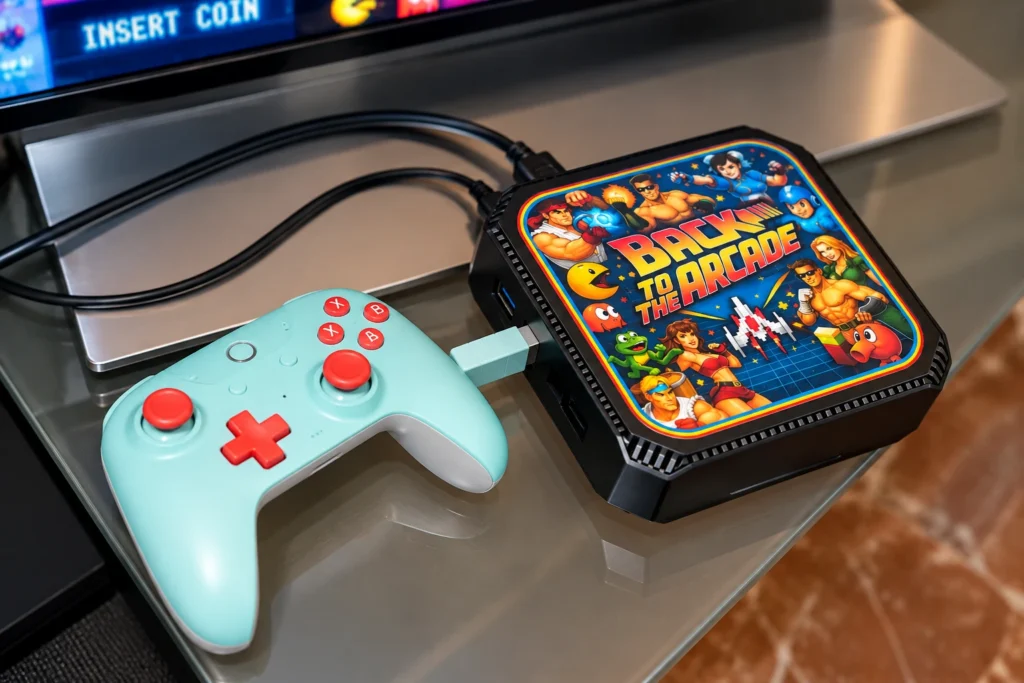
Choosing the best arcade console for your home isn’t simply about finding the system with the largest game library. The right choice depends on what you want to play, how much flexibility you need, whether you prefer arcade controls or a gamepad, and how much time you want to spend configuring the system.
Today, arcade consoles range from simple Pandora Box and Raspberry Pi setups to Batocera mini PCs and powerful MAME or HyperSpin systems. They can all bring classic games to a modern TV, but they offer very different experiences.
I’ve been building arcade systems since 1985, and one thing I’ve learned is that more games or more powerful hardware doesn’t automatically make a better arcade system. Good controls, reliable hardware, sensible configuration and a well-chosen game library matter just as much.
This guide explains the main options and who each one is best suited for.
What Is an Arcade Console?
An arcade console combines the hardware and software needed to play arcade and retro games without requiring a complete cabinet.
Most modern systems connect directly to a television or monitor through HDMI. Depending on the design, games can be controlled using traditional arcade joysticks and buttons or wireless gamepads.
Unlike a full-size or bartop arcade machine, the display isn’t built into the cabinet. This makes an arcade console particularly useful for living rooms, smaller homes and anyone who already has a good TV.
The main platforms you’ll encounter are:
- Pandora Box / JAMMA
- Raspberry Pi and RetroPie
- Batocera
- MAME-based PC systems
- HyperSpin PC systems
Each takes a different approach to retro gaming.
Which Arcade Console Is Best for You?
There is no single system that is best for everyone. This is the quick version:
| Type | Best For | Ease of Use | Flexibility | Hardware |
|---|---|---|---|---|
| Pandora Box | Simple arcade gaming | Excellent | Low | Dedicated board |
| RetroPie | Classic retro & Raspberry Pi fans | Good | High | Raspberry Pi |
| Batocera | Modern multi-system emulation | Excellent | High | Mini PC |
| MAME PC | Dedicated arcade enthusiasts | Good | Very High | PC |
| HyperSpin PC | Premium multi-system setups | Good | Very High | PC |
The best choice depends much more on how you intend to use it than on the number printed on the game list.
Pandora Box – Best for Simple Plug-and-Play Arcade Gaming
A Pandora Box based system is one of the simplest ways to get classic arcade games onto a modern TV.
The hardware is relatively inexpensive, starts quickly and requires very little maintenance. For someone who mainly wants to switch the system on, select a game and start playing, that’s a major advantage.
Best for:
- Casual arcade players
- Families
- Simple plug-and-play operation
- Lower budgets
- Players who don’t want to manage emulators or operating systems
The trade-off is flexibility. Pandora hardware offers far fewer upgrade and customization possibilities than a PC-based system.
Game compatibility and emulation quality can also vary between titles, so I wouldn’t choose a Pandora system simply because it advertises thousands of games.
For a more detailed comparison of its strengths and limitations, see my Pandora Box vs MAME guide.
RetroPie – Best for Raspberry Pi Retro Gaming
RetroPie has been a popular choice for compact retro gaming systems for many years.
Built around Raspberry Pi hardware, it provides access to arcade games as well as classic console platforms while keeping the system small, efficient and relatively inexpensive.
A properly configured RetroPie console can be an excellent middle ground between the simplicity of Pandora hardware and the additional power of a modern PC.
Best for:
- 8-bit, 16-bit and 32-bit classics
- Raspberry Pi enthusiasts
- Arcade and console gaming
- Compact setups
- Users who enjoy customization
RetroPie also has a large enthusiast community, making it attractive to people who enjoy experimenting with their own configuration.
For pure plug-and-play use, however, configuration quality matters. A carefully prepared system is very different from simply loading thousands of ROMs onto an SD card.
Batocera – Best All-Round Modern Retro Gaming Console
Batocera takes a different approach.
Rather than being tied to Raspberry Pi hardware, it can run on a wide range of PCs and mini PCs. That allows considerably more processing power while retaining a console-like interface.
For home use, this makes Batocera particularly attractive. A compact mini PC can sit discreetly beside a television while handling arcade games and a broad range of console emulators.
Modern Batocera setups can also combine wireless controllers, shaders, video previews and carefully organized game collections in a very accessible interface. My current TV system, for example, uses Batocera 42 on mini-PC hardware.
For a compact multi-system setup, a Batocera arcade console for TV combines strong emulation performance with an easy-to-use interface.
Best for:
- Modern TVs
- Multi-system emulation
- Wireless controllers
- Compact living-room setups
- Players who want flexibility without a large cabinet
For many people looking for an all-round home arcade console, Batocera provides one of the best balances between performance, simplicity and flexibility.
MAME – Best for Dedicated Classic Arcade Gaming
If your priority is the arcade rather than the console side of retro gaming, MAME remains difficult to beat.
A properly configured MAME system is capable of reproducing a huge range of original arcade hardware and provides much greater control over video presentation, input configuration and emulator settings than simpler plug-and-play boards.
PC hardware also provides room for future upgrades.
Best for:
- Classic arcade enthusiasts
- Accurate arcade emulation
- Advanced display configuration
- CRT-style shaders and effects
- Large curated arcade collections
- Long-term upgradeability
However, MAME is not automatically better just because it runs on a powerful PC. Configuration is critical.
A poorly configured PC with 50,000 games can provide a worse experience than a modest system with a carefully tested library.
I’ve covered this subject in much greater detail in my MAME Arcade Cabinet guide, so I won’t duplicate it here.
HyperSpin – Best Premium Arcade Console
HyperSpin is different from the other options because it is primarily a frontend rather than an emulator.
Its strength is presentation.
A well-built HyperSpin system can bring together MAME and numerous console emulators within an animated interface containing system artwork, themes, wheel navigation and video previews.
Combined with capable PC hardware, this makes it particularly suitable for high-end arcade consoles with very large, organized game libraries.
Best for:
- Arcade enthusiasts
- Large multi-system collections
- Premium visual presentation
- Powerful PC hardware
- Users who want arcade and console platforms in one system
The disadvantage is complexity. Creating and maintaining a good HyperSpin installation takes considerably more work than using a Pandora Box.
For enthusiasts who value the interface and breadth of the collection, however, that extra complexity can be worthwhile.
1-Player or 2-Player Arcade Console?
This is often overlooked when choosing an arcade console.
A one-player arcade console is smaller, lighter and easier to store. For classic shooters, platform games and many early arcade titles, a second set of controls may rarely be used.
A two-player console makes much more sense if you regularly play fighting games, beat ’em ups or competitive titles with friends and family.
Games such as Street Fighter, Mortal Kombat and many classic co-op titles benefit immediately from having two complete control sets available.
But don’t choose solely by player count. The physical layout matters too.
Two joysticks and two sets of buttons require enough space between players to remain comfortable. Cramming two control sets onto an undersized panel may look impressive in photographs but can make the machine less enjoyable to use.
Arcade Controls or Wireless Gamepads?
This is another important distinction.
If you mainly want to play arcade titles, real arcade controls provide an experience that a conventional gamepad can’t fully reproduce.
A good arcade control panel should use reliable joysticks, responsive buttons and a low-latency encoder. Components from established arcade manufacturers such as Sanwa and Seimitsu are popular for good reason.
Gamepads make more sense for console platforms that were originally designed around them, particularly games that require analogue sticks or shoulder buttons.
For a broad multi-system setup, having both can be ideal:
arcade controls for arcade games, gamepads for console games.
Arcade Console for TV vs Arcade Cabinet
An arcade console and a complete arcade cabinet can run much of the same software, but the experience is very different.
| Arcade Console | Arcade Cabinet |
|---|---|
| Uses your existing TV | Dedicated display |
| Requires very little space | Requires dedicated space |
| Easy to move and store | More permanent installation |
| Can use gamepads or arcade controls | Integrated arcade controls |
| Ideal for living rooms | Closest to the traditional arcade experience |
| Generally more affordable | Complete self-contained machine |
If you already own a large modern TV and don’t have room for a cabinet, an arcade console for TV makes a lot of sense.
If recreating the physical arcade experience is the priority, a dedicated bartop or full cabinet is still difficult to replace.
Neither is inherently better. They solve different problems.
What Should You Look for Before Buying an Arcade Console?
Don’t judge a system by game count alone.
When comparing arcade consoles, I would pay particular attention to five things:
1. Controls
For arcade gaming, the joystick, buttons and encoder directly affect how the machine feels.
2. Hardware
The processor and graphics hardware should be appropriate for the systems being emulated. More expensive hardware isn’t always necessary for older arcade titles.
3. Software Configuration
Emulators need to be configured correctly for controls, video, audio and individual systems. This is where much of the difference between a generic setup and a polished one becomes apparent.
4. Storage Reliability
Large game libraries are useless if they’re stored on unreliable media. Storage quality becomes particularly important with systems that depend on SD cards.
5. Support and Long-Term Reliability
Consider what happens after you buy the system. Can hardware be replaced? Can the software be restored? Is technical support available if something goes wrong?
These questions become increasingly important if you’re buying a system intended to last for many years.
Don’t Choose an Arcade Console by Game Count Alone
This deserves its own section because game count has become one of the most misleading specifications in retro gaming.
A system advertised with 50,000 games isn’t necessarily better than one containing 5,000.
Large collections can contain:
- duplicate ROMs
- regional versions of the same game
- games that don’t run correctly
- titles requiring controls the system doesn’t have
- poor or incomplete emulator configurations
A smaller, carefully tested collection is often far more enjoyable.
When I configure an arcade system, I would rather have a game launch correctly, display properly and respond as expected than simply add another number to a specification sheet.
Quality of configuration matters more than quantity.
So, What Is the Best Arcade Console for Home?
For most buyers, I would narrow the decision down like this:
Choose Pandora Box if you want an affordable, straightforward arcade system with minimal configuration.
Choose RetroPie if you like Raspberry Pi hardware and want a compact system covering classic arcade and console generations.
Choose Batocera if you want a modern, flexible and easy-to-use multi-system console for a TV.
Choose MAME on PC if classic arcade emulation, customization and long-term flexibility are your priorities.
Choose HyperSpin on PC if you want a premium presentation and a large multi-system collection with an elaborate arcade-style frontend.
There isn’t one best arcade console for every player. The best system is the one that matches the games you actually want to play, the controls you prefer and the amount of flexibility you need.
Arcade Consoles Built for Home Gaming
I have been building arcade systems since 1985, and today I still build and configure each Tiny Arcade system individually.
My TV arcade consoles range from straightforward JAMMA-based systems and Raspberry Pi builds to Batocera mini PCs and high-end HyperSpin PC consoles. The objective is the same regardless of platform: reliable hardware, responsive controls and a system that’s enjoyable to use rather than simply impressive on a specification sheet.
If you already have a TV and want the arcade experience without dedicating space to a complete cabinet, you can explore my Arcade Consoles for TV and compare the available configurations.
5-Year Warranty · Lifetime Support · Worldwide Shipping
Frequently Asked Questions
What is the best arcade console for home use?
There is no single best option for everyone. Pandora Box is well suited to simple plug-and-play gaming, RetroPie works well for Raspberry Pi setups, Batocera offers an excellent balance of performance and ease of use, while MAME and HyperSpin PC systems provide greater flexibility for enthusiasts.
Can I connect an arcade console to a modern TV?
Yes. Modern arcade consoles generally use HDMI and can connect directly to a compatible television. Display configuration and aspect ratio still matter because many classic arcade games were originally designed for 4:3 displays.
Is Batocera better than RetroPie?
Neither is universally better. Batocera is particularly convenient for PC and mini-PC systems and emphasizes an integrated console-like experience. RetroPie remains an excellent choice for Raspberry Pi-based systems and users who value customization.
Is MAME better than Pandora Box?
For flexibility, emulator configuration and long-term upgradeability, a PC-based MAME setup has major advantages. Pandora Box is simpler and generally more affordable. The better choice depends on whether you prioritize simplicity or customization.
Is a 1-player or 2-player arcade console better?
A one-player console is more compact and works particularly well for solo arcade gaming. A two-player model is preferable for fighting games, beat ’em ups and multiplayer gaming with friends or family.
Do more games mean a better arcade console?
No. Game count doesn’t indicate emulation quality, control configuration or reliability. A smaller, carefully configured and tested library can provide a much better experience than a huge collection containing duplicates and poorly supported games.